
How to Monitor Backlinks: Sheet Script vs Tool
Published 8 min read
Ask link builders how they keep track of the links they earned and the usual answer is a spreadsheet. Ask what happens when a partner quietly removes a link three months later and the usual answer is that nobody notices.
This guide covers both ways to fix that. First a free Google Sheet with a script you can copy, then a monitoring tool, with an honest account of where each one stops working. Swappsy is our product and it is one of those tools, so weigh that part accordingly.
What to check on every backlink
A link can still be on the page and be worth nothing. A real check looks at five things:
- The page loads. A 404, or a redirect to another page, means the link is gone with it.
- The link is still there and points to the page you agreed.
- The rel attribute. A link that was followed can be changed to nofollow, sponsored or ugc.
- The anchor text. Editors rewrite sentences, and your anchor goes with them.
- The page can be indexed. A noindex tag takes the whole page out of Google.
Method 1: a Google Sheet with a script
This costs nothing and takes about ten minutes. The script opens every page in your sheet, runs the five checks and writes the result next to each link.
- Make a new Google Sheet. In row 1 type the headers: Placement URL in A, Target URL in B and Expected anchor in C. Name D to I Status, Rel, Anchor found, HTTP, Note and Last checked.
- From row 2 down, add one link per row. The placement URL is the page that links to you. The target URL is your page. The anchor is optional.
- Open Extensions, then Apps Script. Delete what is there, paste the script below and save.
- Reload the sheet. A Backlinks menu appears. Choose Check all links. The first time, Google asks you to allow the script to read pages, edit the sheet and send you email.
- To run it by itself, open Triggers in Apps Script, add a trigger for
checkAllLinks, and pick a time-driven trigger that runs weekly or daily.
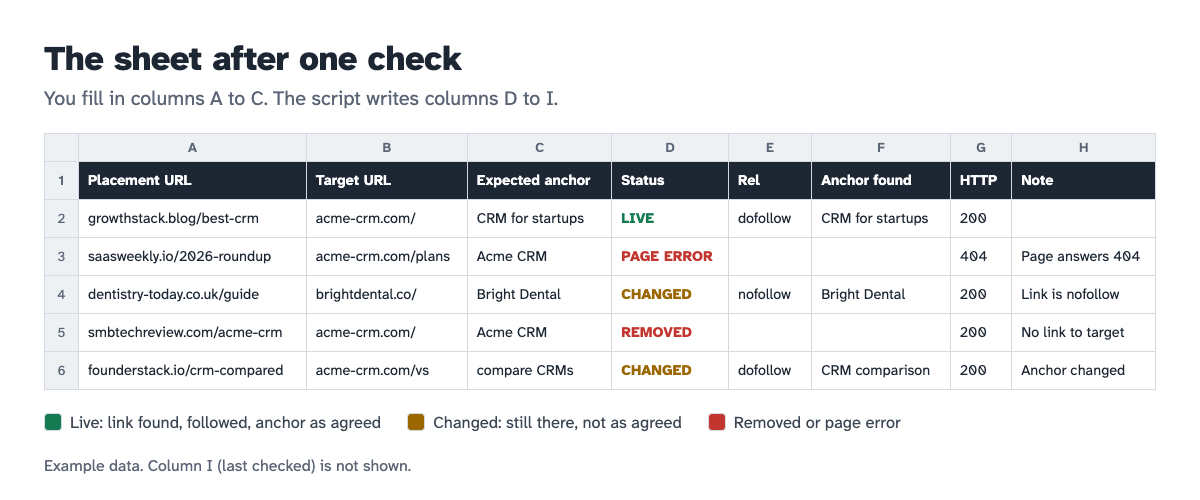
The statuses mean:
- LIVE: the link is there, followed, and the anchor matches.
- CHANGED: the link is there but not as agreed. The note says why: nofollow, sponsored, a different anchor, or a noindex page.
- REMOVED: the page loads and has no link to your target.
- PAGE ERROR: the page did not load. The HTTP column has the code.
When a status is different from the last run, the script emails you the list of changes.
The script
/**
* Backlink checker for Google Sheets.
*
* Row 1 is the header. You fill in:
* A Placement URL the page that links to you
* B Target URL your page the link should point to
* C Expected anchor optional
* The script writes:
* D Status E Rel F Anchor found G HTTP H Note I Last checked
*/
var FIRST_ROW = 2;
var EMAIL_ON_CHANGE = true;
function onOpen() {
SpreadsheetApp.getUi()
.createMenu('Backlinks')
.addItem('Check all links', 'checkAllLinks')
.addToUi();
}
function checkAllLinks() {
var sheet = SpreadsheetApp.getActiveSpreadsheet().getSheets()[0];
var last = sheet.getLastRow();
if (last < FIRST_ROW) return;
var count = last - FIRST_ROW + 1;
var rows = sheet.getRange(FIRST_ROW, 1, count, 4).getValues();
var out = [];
var changes = [];
rows.forEach(function (row) {
var page = String(row[0]).trim();
var target = String(row[1]).trim();
var before = String(row[3]).trim();
if (!page || !target) {
out.push(['', '', '', '', '', '']);
return;
}
var result = checkLink(page, target, String(row[2]).trim());
out.push(result);
if (before && before !== result[0]) {
changes.push(page + '\n ' + before + ' -> ' + result[0] + (result[4] ? ' (' + result[4] + ')' : ''));
}
Utilities.sleep(500);
});
sheet.getRange(FIRST_ROW, 4, count, 6).setValues(out);
if (EMAIL_ON_CHANGE && changes.length) {
MailApp.sendEmail(
Session.getEffectiveUser().getEmail(),
changes.length + ' backlink(s) changed',
changes.join('\n\n')
);
}
}
/** Returns [status, rel, anchor found, HTTP code, note, checked at]. */
function checkLink(pageUrl, targetUrl, expectedAnchor) {
var now = new Date();
var response;
try {
response = UrlFetchApp.fetch(pageUrl, { muteHttpExceptions: true, followRedirects: true });
} catch (e) {
return ['PAGE ERROR', '', '', '', 'Page did not load', now];
}
var code = response.getResponseCode();
if (code >= 400) return ['PAGE ERROR', '', '', code, 'Page answers ' + code, now];
var html = response.getContentText();
var link = findLink(html, targetUrl);
if (!link) return ['REMOVED', '', '', code, 'No link to target', now];
var notes = [];
var robots = metaRobots(html);
var followed = link.rel === 'dofollow' && robots.indexOf('nofollow') === -1;
if (link.rel !== 'dofollow') notes.push('Link is ' + link.rel);
else if (!followed) notes.push('Page is nofollow');
if (robots.indexOf('noindex') !== -1) notes.push('Page is noindex');
if (expectedAnchor && normalizeText(expectedAnchor) !== normalizeText(link.anchor)) notes.push('Anchor changed');
return [notes.length ? 'CHANGED' : 'LIVE', link.rel, link.anchor, code, notes.join('; '), now];
}
/** Finds the first <a> on the page whose href points to the target. */
function findLink(html, targetUrl) {
var target = normalizeUrl(targetUrl);
var clean = html.replace(/<!--[\s\S]*?-->/g, '');
var tag = /<a\b([^>]*)>([\s\S]*?)<\/a>/gi;
var match;
while ((match = tag.exec(clean)) !== null) {
var href = attribute(match[1], 'href');
if (!href || normalizeUrl(href) !== target) continue;
var rel = attribute(match[1], 'rel').toLowerCase().split(/\s+/).filter(function (token) {
return token === 'nofollow' || token === 'sponsored' || token === 'ugc';
});
return { rel: rel.length ? rel.join(' ') : 'dofollow', anchor: anchorText(match[2]) };
}
return null;
}
/** Reads an attribute whether it is written with double quotes, single quotes or none. */
function attribute(attributes, name) {
var found = new RegExp('(?:^|\\s)' + name + '\\s*=\\s*(?:"([^"]*)"|\'([^\']*)\'|([^\\s"\'>]+))', 'i').exec(attributes);
if (!found) return '';
return decodeEntities(found[1] !== undefined ? found[1] : found[2] !== undefined ? found[2] : found[3]).trim();
}
/** http and https, www, a trailing slash and #fragments are treated as the same address. */
function normalizeUrl(url) {
return String(url)
.trim()
.replace(/#.*$/, '')
.replace(/^https?:\/\//i, '')
.replace(/^www\./i, '')
.replace(/^([^\/?]+)/, function (host) { return host.toLowerCase(); })
.replace(/\/$/, '');
}
function anchorText(inner) {
var text = normalizeSpaces(decodeEntities(inner.replace(/<[^>]+>/g, ' ')));
if (text) return text;
var image = /<img\b([^>]*)>/i.exec(inner);
return image ? normalizeSpaces(attribute(image[1], 'alt')) : '';
}
function metaRobots(html) {
var found = /<meta\b[^>]*name\s*=\s*["']?robots["']?[^>]*>/i.exec(html);
return found ? attribute(found[0].replace(/^<meta/i, ''), 'content').toLowerCase() : '';
}
function decodeEntities(text) {
return String(text)
.replace(/&/g, '&')
.replace(/"/g, '"')
.replace(/�?39;|'/g, "'")
.replace(/ /g, ' ')
.replace(/</g, '<')
.replace(/>/g, '>');
}
function normalizeSpaces(text) {
return String(text).replace(/\s+/g, ' ').trim();
}
function normalizeText(text) {
return normalizeSpaces(text).toLowerCase();
}We ran this script's checks against sample pages: links written with and without quotes, nofollow and sponsored links, a link inside an HTML comment, an image link, a noindex page and a 404. Try it on a few links you know the state of before you rely on it.
Where the sheet stops working
- It runs out of time. Google stops a script after 6 minutes. At a second or two per page, that is a few hundred links at most. Past that you have to split the list across sheets.
- It raises false alarms. The script decides on one look. A page that was slow for a minute is reported the same way as a page that was deleted.
- Some sites block it. Bot protection can refuse a request that comes from a script. A healthy page then shows as PAGE ERROR.
- It can't see links added by JavaScript. The script reads the HTML the server sends. A link that only appears after the page runs its scripts looks removed.
- It keeps no history. Each run overwrites the last. You can't tell when a link changed, or whether it has gone and come back before.
- It belongs to one person. The trigger runs under the account that created it. When that person leaves, the checks stop and nothing says so.
- It knows only what you typed. Who the partner was, what you paid and when the placement ends live in other columns that someone has to keep up.
None of this matters for 30 links you look at every week. It starts to matter with a few hundred links, a client, or money attached.
Method 2: a monitoring tool
A monitoring tool does the same five checks on a schedule you don't have to keep alive. The good ones add what the sheet can't:
- a second check before they report a link as removed;
- a record of every change with its date;
- alerts by email, so nobody has to open anything;
- imports from the places your links already are;
- the terms of each link next to its status.
In Swappsy, each link is checked once a day. A link is reported removed only after two failed checks in a row, and you are told if it comes back. A live link that changes its rel or anchor, or whose page turns noindex, is flagged as changed. You can record whether a link was free, exchanged or paid, the amount, the partner and the date it ends. The free plan watches 50 links.
Moving over takes a minute. In your sheet, select the rows in columns A to C without the header and copy them. In Swappsy, open Backlinks, choose Import backlinks and paste.
Swappsy is one option. Our comparison of backlink monitoring tools covers eleven others, with prices.
Sheet or tool?
| Google Sheet with a script | Monitoring tool | |
|---|---|---|
| Cost | Free | Free for a small list, then monthly |
| Setup | About 10 minutes, some comfort with scripts | Paste or import your list |
| Size | A few hundred links per sheet | Thousands |
| False alarms | One bad page load is enough | Confirmed before you hear about it |
| History | None | Every change, dated |
| Upkeep | Yours | The vendor's |
| Best for | Your own site, under 100 links | Clients, paid links, exchanges at volume |
What to do when a link disappears
- Look at the page yourself. Confirm the link is gone and see what changed. A rewritten section is an easier conversation than a deleted article.
- Write the same day. Name the page, the link, the anchor and when it was agreed. People restore links they can find in one click.
- Check the terms. A paid placement usually has a guarantee period. An exchange has your own link as its counterweight.
- Set a date. If nothing happens in a week, decide: ask for a replacement, a refund, or take your own link down.
- Write down how it ended. The next time you deal with that partner, you will want to know.
A message that works:
Hi Sam, the link to acme-crm.com in your article "Best CRM for startups" was there until last week and is missing now. We agreed it on March 4 with the anchor "CRM for startups". Could you put it back? Here is the page: growthstack.blog/best-crm. Thanks.
Frequently asked questions
How do I monitor backlinks for free?
Use the sheet and script above, or a free plan of a monitoring tool. Search Console is free too, and it is where to get your list of links, but it does not tell you when one is removed.
Does Google Search Console show lost backlinks?
No. Google's own help page says the links in the report "may have since been removed", and that the report doesn't say whether a link is nofollow.
How often should I check my backlinks?
Daily for links you paid for or traded, because the sooner you ask the easier the fix. Weekly is enough for links nobody promised you.
Can the script check thousands of backlinks?
Not in one run. Google stops a script after 6 minutes. You can split the list across several sheets with their own triggers, and at that point a tool is less work.