Link Reclamation: How to Recover Lost Backlinks in 2026

By Sonam Gour
Published Updated 9 min read
Winning a new backlink from scratch takes prospect lists, follow-ups, drafts or cash. Recovering a backlink that already existed usually takes one redirect or a four-line email—because the site owner already decided your page was worth linking to.
Most teams still leave those links on the table for a simple reason: nobody notices when an old link breaks, gets cut during a content refresh or flips to nofollow. By the time rankings slip in Google Search Console, months have passed and the editor who published the piece has moved on.
This guide walks through how link reclamation actually works in 2026: how to diagnose why each backlink disappeared, which lost links are worth chasing, four email templates that get replies, and how to watch your placements so you catch drops within 24 hours instead of six months later. Swappsy is our product and we mention how we handle monitoring where relevant, so read those notes accordingly.
Link reclamation vs broken link building (they are not the same thing)
SEO guides constantly mix up two different tactics:
- Link reclamation recovers links that used to point to your own site (or unlinked brand mentions about your company) that broke, disappeared or lost their agreed link attributes.
- Broken link building hunts dead pages on competitors' sites and pitches cold strangers to link to your guide instead.
Cold broken link building converts at 1% to 3% on a good week because the publisher doesn't know you. Link reclamation converts at 25% to 60%—and hits 100% when the broken URL is on your own domain—because the editorial relationship already exists.
The four ways backlinks disappear (and how fast each one fixes)
Before writing to any site owner, open both the linking page and your target URL in an incognito window and inspect the HTML source. Nearly every lost backlink falls into one of four buckets, and each bucket calls for a completely different response.
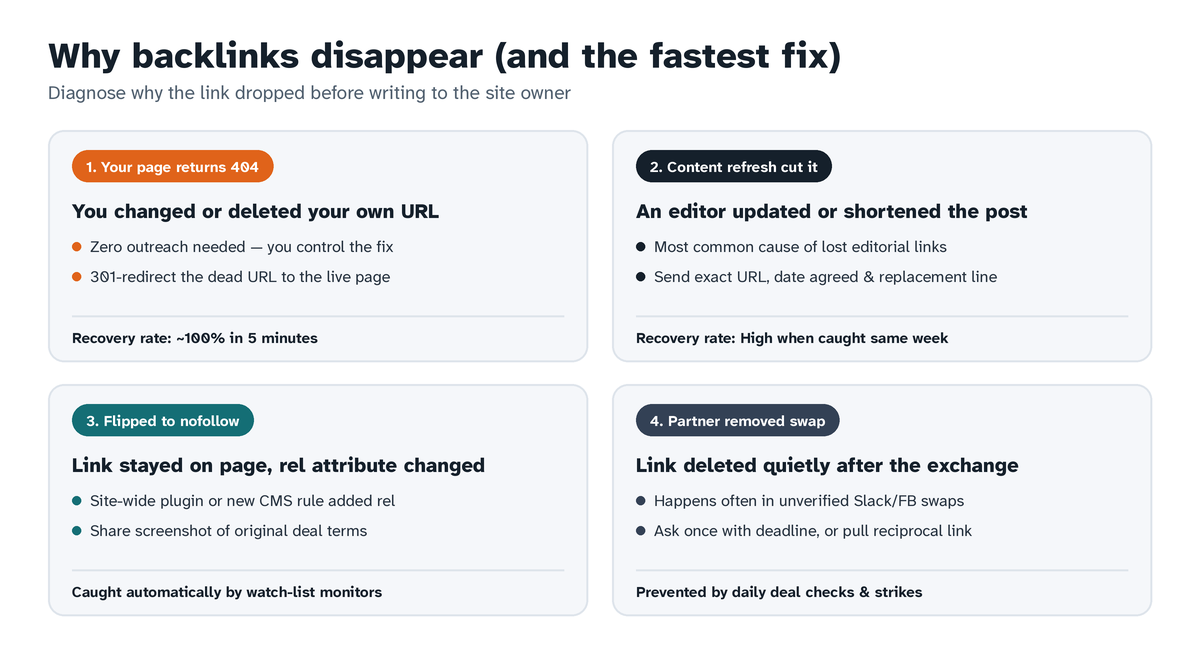
| Cause | What happened | Who fixes it | Typical recovery rate | Time to fix |
|---|---|---|---|---|
| 1. 404 on your own site | Someone changed a URL slug, deleted an old product/blog post or migrated domains without redirects | You (server/CMS redirect) | ~100% | 5 minutes |
| 2. Content refresh cut your link | An editor rewrote, shortened or merged an older article and dropped outbound links | Publisher editor | 35%–55% (caught early) | 1–5 days |
| 3. Attribute flipped to nofollow / sponsored | A new SEO plugin, CMS update or sitewide outbound link script added rel="nofollow" | Publisher webmaster | 40%–65% on agreed deals | 1–3 days |
| 4. Partner quietly removed a swap or paid link | A link exchange partner or seller deleted your link weeks after the deal closed | Partner / marketplace strike system | High on tracked deals; low on unverified chats | Same day to 7 days |
1. Your own target URL returns 404 or redirects through a chain
Every site redesign, slug cleanup or pruned blog post leaves orphaned URLs behind. If five external blogs linked to /blog/saas-onboarding-2024 and someone renamed the slug to /blog/saas-onboarding without adding a 301 redirect, Google drops the equity from all five backlinks overnight.
You don't need to email anyone to fix this. Export every broken target URL that still has external referring domains, map each one directly with a single-hop 301 redirect to the closest live equivalent page on your site, and avoid redirecting everything lazily to your homepage (Google treats mass homepage redirects from unrelated pages as soft 404s).
2. A content refresh or article merge cut your outbound link
Content teams update top-ranking posts every 6 to 12 months. Writers assigned to "refresh and tighten" a 2,500-word article routinely cut external citations they don't recognize—including guest post links, roundup spots and resource links placed by a previous editor.
Timing decides everything here. If you message the editor within a week of the update—while the article is still fresh in their head—a polite note with the exact URL and a one-sentence replacement line often gets the link restored the same afternoon. Wait five months and nobody remembers touching the page.
3. The link stayed on the page, but its rel attribute or indexability changed
Crawl-index tools often report a link as "Live" even after its SEO value has been gutted. Three quiet changes catch teams off guard:
- A WordPress plugin automatically adds
rel="nofollow external"to every outbound domain not on a manual allowlist. - The linking article gets tagged
<meta name="robots" content="noindex">during a thin-content cleanup or staging push. - Your anchor text gets edited from a relevant phrase into a bare URL or pointed to a redirect loop.
Because the anchor text is still visible to human eyes on the page, you will never spot this by clicking around manually. Only an HTML parser watching rel attributes and robot directives flags it. For a deeper breakdown of how automated crawlers inspect those signals, read our walkthrough on how to monitor backlinks properly.
4. A swap partner or link seller quietly removed your link
Anyone who has traded links in Slack channels, Facebook groups or cold email threads knows this pattern: both sides publish their links on Tuesday, everybody says thanks, and forty days later one partner deletes their outbound link assuming you won't recheck.
The same thing happens with cheap unvetted link insertions (niche edits) sold by resellers who don't control the site long term. When you catch a silent removal quickly and have proof of the original agreement, you can either get the link restored immediately or pull your reciprocal link so the deal stays fair.
Step-by-step workflow to find and prioritize lost backlinks
Step 1: Pull your historical broken target pages first
Start with zero-outreach wins on your own site:
- Open Google Search Console → Pages → Not found (404), and cross-check with your crawler's "Best by links" report filtered to
404and410status codes. - Sort broken URLs by referring domains (or verified Search Console traffic on the linking pages).
- Add clean
301redirects for every dead page that carries real links from legitimate sites. Leave spammy scraper links alone.
Step 2: Export lost and altered backlinks from the last 90 days
Next, pull lost links from two places: your SEO index tool (Ahrefs, Semrush or Moz "Lost backlinks" report filtered to the past 60–90 days) and your active link watch list. Don't waste outreach hours on low-value noise. Filter out:
- Sitewide footer/sidebar links removed when a theme changed,
- Auto-generated scraper directories, whois sites and zero-traffic domains,
- Pages that went permanently offline because the entire domain expired.
Focus only on contextual editorial links on real, indexed pages that still get search impressions or belong to active partners.
Step 3: Check what is actually on the linking URL right now
Never email an editor saying "you removed our link" before loading the URL yourself. Sometimes a crawl bot hit a 502 CDN timeout for ten seconds and marked a perfectly healthy link dead. This exact false-positive problem is why Swappsy's backlink status checker waits for two missed checks in a row before marking any link Removed, ignoring temporary timeouts completely.
Open the live page and confirm whether:
- The page still exists and covers your topic (ideal candidate for a quick re-insertion),
- The page redirected to a newer guide on the same domain (ask to add your citation to the updated guide), or
- The link is still present in the paragraph, just wrapped in a new
nofollowattribute.
Four link reclamation email templates that actually get replies
Keep reclamation emails short, factual and zero-drama. Editors hate passive-aggressive guilt trips; most removals during content updates are genuine accidents.
Template 1: Link dropped during an article update (editorial or roundup link)
Subject: Quick note on your updated [Topic] guide

Hi [First Name],

Saw you recently refreshed your guide on [Article Title] ([Linking URL])—the updated section on [Specific Detail] reads much cleaner.

In the previous version, you linked to our resource on [Your Topic] ([Your URL]), which looks like it got trimmed in the edit. If it still fits the new draft, here is a clean one-line reference you can drop straight into the [Section Name] section so you don't have to rewrite anything:

"[One natural sentence citing your page with natural anchor text.]"

Totally understand if the angle changed—thanks either way for the original mention!

Best,
[Your Name]
Template 2: Agreed link flipped to nofollow after a plugin change
Subject: Quick heads-up on our link in [Article Short Title]

Hi [First Name],

Hope your week is going well! Quick technical note on the collaboration we published on [Date] ([Linking URL]).

Our link monitor flagged that the link to [Your URL] picked up a rel="nofollow" attribute this week—usually that happens automatically when an SEO or external-links plugin updates sitewide rules.

Since we agreed on a standard dofollow link for this swap, could you add [yourdomain.com] to your allowlist or remove the nofollow tag when you have two minutes? Our link to your guide at [Partner URL on Your Site] is still live and dofollow on our end.

Thanks a ton!
[Your Name]
Template 3: Direct link swap partner removed your link silently
Subject: Checking in on our link swap ([Your Domain] / [Partner Domain])

Hi [First Name],

Quick check-in on the link exchange we set up on [Date]:
- Your link on our site (still live): [URL on Your Site]
- Our link on your site: [Linking URL]

Our daily monitor noticed our link to [Your Target URL] is no longer on your page. Was that removed intentionally or caught in a recent post edit?

If it slipped out during an edit, let me know once it's back live this week. If your content plans changed and you'd rather wind down the swap, no hard feelings—we'll just update our post on Friday to keep things even.

Best,
[Your Name]
Template 4: Unlinked brand mention (turning plain text into a live backlink)
Subject: Thanks for mentioning [Your Brand] in your [Topic] post!

Hi [First Name],

Just read your piece on [Article Title] and spotted the mention of [Your Brand]—appreciate you including us alongside [Other Tool Mentioned].

Would you mind making "[Your Brand]" clickable to [Your Relevant URL] so readers can jump straight to the page you referenced? Happy to share the article with our newsletter/social feed once updated too.

Thanks again,
[Your Name]
How to stop losing links silently in the first place
Reclaiming lost links works best when you don't wait for quarterly audits. Two habits cut link loss dramatically:
- Watch every earned, swapped and paid URL automatically. Import your active backlink list once via CSV into a dedicated watch-list monitor—we compared the top options in our breakdown of the best backlink monitoring tools. On Swappsy's free plan ($0/mo), you can import up to 1,000 backlinks across 5 verified sites for weekly checks, or step up to daily rechecks for 2,000 backlinks on Pro ($4.99/mo).
- Keep partnerships and paid placements inside a system with accountability. When two verified site owners run a direct link exchange, content collaboration or zero-commission placement through Swappsy, every link is checked daily automatically. If someone removes or alters an agreed link inside 90 days, our strike system steps in immediately—see how deals and daily checks work before setting up your next swap.
Frequently asked questions
How long after a 301 redirect does Google pass lost backlink equity back?
Once Googlebot recrawls the external pages pointing to your old URL (or recrawls your old URL directly), link signals consolidate within a few days to a few weeks depending on crawl frequency. Keep that 301 redirect live permanently—or for at least one full year—so Google can lock in the canonical target.
Should I use a 301 redirect or ask the site owner to update the URL directly?
Put the 301 redirect in place immediately on day one—that takes five minutes and captures nearly full equity right away. For your top five or ten highest-authority placements, you can also send a friendly note offering the clean updated URL so future readers skip the redirect hop.
How many follow-ups should I send for a removed editorial link?
One initial email plus a single polite bump five business days later is plenty. Sending four follow-ups over one removed citation burns relationships fast. If a direct swap partner ignores both messages, simply remove your reciprocal link and move on.
Does link reclamation help when an entire linking domain shut down?
No. If the other business closed and let its domain expire, nobody can put that link back properly, and buying expired domains just to recreate old links invites spam penalties. Focus your time on active websites where an editor still manages the page.
What is the fastest free way to monitor reclaimed backlinks so they don't drop again?
You can connect Swappsy's free backlink monitoring tool at $0/month (no credit card required), upload your reclaimed URLs via CSV up to 1,000 backlinks, and get email notifications whenever any link moves from Live to Changed or Removed.